'%3e%3cpath%20d='M19.3359%2018.2109L14.7344%2013.6094C15.875%2012.2188%2016.5625%2010.4375%2016.5625%208.49609C16.5625%204.04297%2012.9492%200.429688%208.49609%200.429688C4.03906%200.429688%200.429688%204.04297%200.429688%208.49609C0.429688%2012.9492%204.03906%2016.5625%208.49609%2016.5625C10.4375%2016.5625%2012.2148%2015.8789%2013.6055%2014.7383L18.207%2019.3359C18.5195%2019.6484%2019.0234%2019.6484%2019.3359%2019.3359C19.6484%2019.0273%2019.6484%2018.5195%2019.3359%2018.2109ZM8.49609%2014.957C4.92969%2014.957%202.03125%2012.0586%202.03125%208.49609C2.03125%204.93359%204.92969%202.03125%208.49609%202.03125C12.0586%202.03125%2014.9609%204.93359%2014.9609%208.49609C14.9609%2012.0586%2012.0586%2014.957%208.49609%2014.957Z'%20fill='%23535B62'/%3e%3c/g%3e%3cdefs%3e%3cclipPath%20id='clip0_12799_29299'%3e%3crect%20width='20'%20height='20'%20fill='white'/%3e%3c/clipPath%3e%3c/defs%3e%3c/svg%3e)

Parametric vs Direct Modeling: What's the Difference?

Choosing the right modeling approach can make a significant difference in how quickly you design, modify, and manufacture parts. Two of the most common methods used in modern CAD software are parametric modeling and direct modeling. While both create accurate 3D models, they solve design challenges in different ways.
Understanding how each method works helps engineers, product designers, and manufacturers choose the right workflow for their projects.
What Is Parametric Modeling?
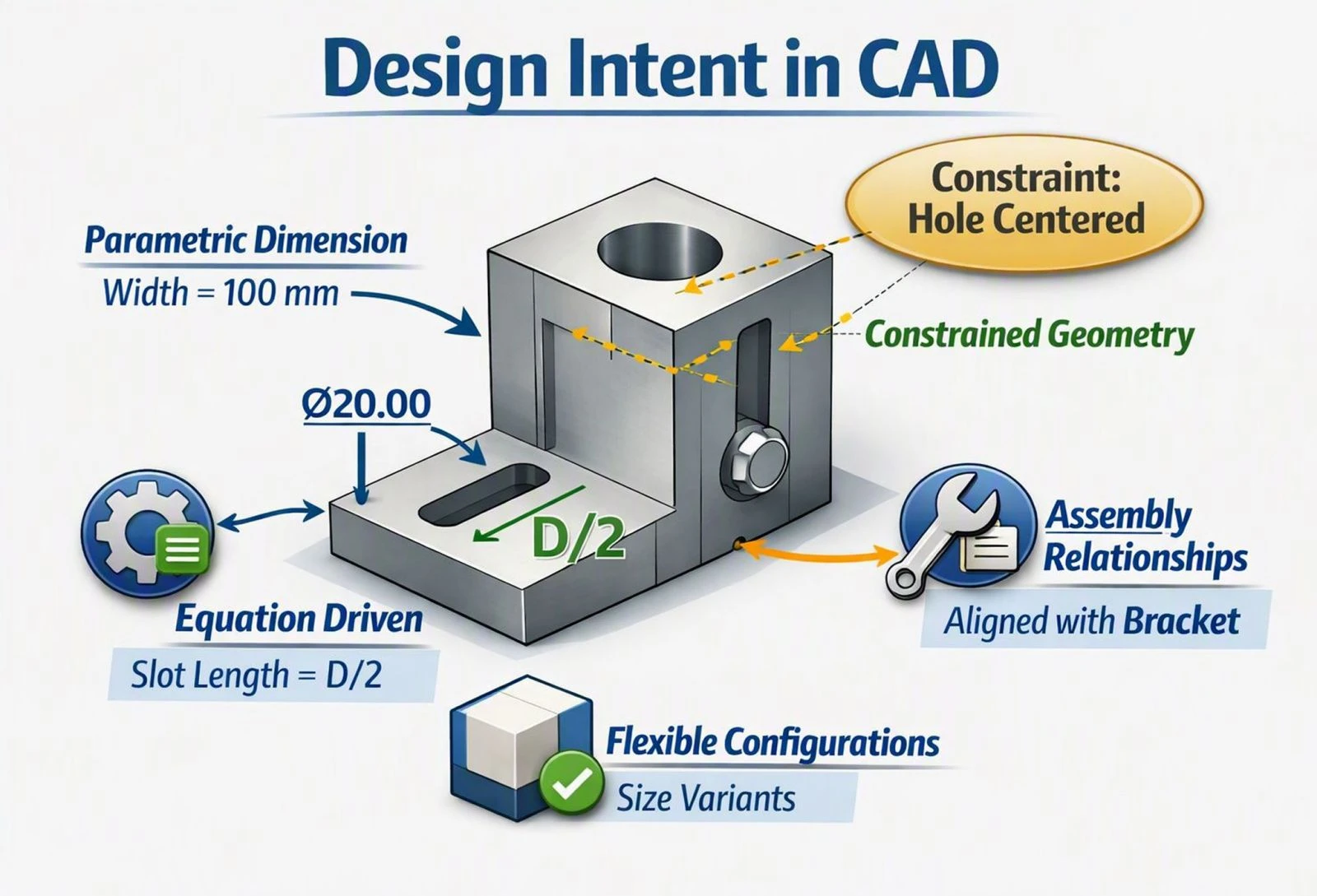
Parametric modeling is a design method that builds a model using dimensions, constraints, and feature relationships. Every sketch, extrusion, hole, fillet, or chamfer becomes part of a feature history that records how the model was created.
When you modify a dimension or feature, the CAD software automatically updates every related feature while maintaining the design intent.
For example, changing the diameter of a shaft can automatically resize matching holes, bearings, or mating components within an assembly.
This intelligent relationship between features makes parametric modeling the preferred approach for mechanical engineering and production-ready designs.
Advantages of Parametric Modeling
-
Easy to modify dimensions without rebuilding the model
-
Maintains design intent through feature relationships
-
Ideal for configurable products
-
Supports complex assemblies
-
Excellent for manufacturing documentation
-
Makes design revisions faster and more consistent
Limitations
Because every feature depends on previous features, modifying older parts of the feature tree can sometimes affect downstream geometry. Large feature histories may also become more complex as projects grow.
What Is Direct Modeling?
Direct modeling takes a different approach.
Instead of relying on a feature history, direct modeling allows designers to interact directly with the geometry. Faces, edges, and surfaces can be moved, resized, deleted, or offset without editing sketches or rebuilding the feature tree.
This makes direct modeling particularly useful when working with imported CAD files or making quick design changes.
For example, if a supplier sends a STEP file with no design history, direct modeling lets you modify the geometry immediately instead of recreating the model.
Advantages of Direct Modeling
-
Fast editing of imported models
-
No dependency on feature history
-
Quick concept changes
-
Simple geometry modifications
-
Useful for design reviews and last-minute updates
Limitations
Without parametric relationships, repeated design changes may require additional manual work. Maintaining consistency across multiple related features can also become more difficult in complex mechanical assemblies.
Parametric vs Direct Modeling: Key Differences
| Feature |
Parametric Modeling |
Direct Modeling |
| Feature Tree | Yes | No |
| Design History | Yes | No |
| Driven by Dimensions | Yes | Limited |
| Quick Geometry Changes | Good | Excellent |
| Limited | Limited | Excellent |
| Assembly Design | Excellent | Good |
| Manufacturing Workflows | Excellent | Good |
| Manufacturing Workflows | Maintained | Manual |
Which Modeling Method Is Better?
There is no universal winner.
The best choice depends on your workflow.
Choose parametric modeling when:
-
Designing production parts
-
Creating mechanical assemblies
-
Building configurable products
-
Working with dimensions that change frequently
-
Preparing parts for manufacturing, — to learn how design decisions affect production, see our article on What is DFM?
Choose direct modeling when:
-
Editing imported CAD files
-
Making quick geometry changes
-
Reviewing customer designs
-
Creating early design concepts
-
Working with models that have no feature history
Many modern CAD platforms combine both approaches to give designers greater flexibility.
Why Parametric Modeling Matters for Mechanical Design
Mechanical products rarely remain unchanged throughout development.
Dimensions are adjusted, components are replaced, tolerances change, and customer requirements evolve. Parametric modeling allows these updates to happen efficiently by automatically rebuilding the model while preserving relationships between features.
This reduces design time, minimizes errors, and helps engineers respond quickly to manufacturing changes.
How HVH Designer Uses Parametric Modeling
HVH Designer is a browser-based CAD platform that uses parametric modeling to help engineers create accurate mechanical parts and assemblies.
Instead of rebuilding models from scratch, users can update dimensions and allow related geometry to adjust automatically. This makes it easier to create product variations, modify assemblies, and respond to design changes throughout the development process.
HVH Designer also includes a growing 3D parts library, allowing engineers to insert real industrial components directly into their assemblies. Combined with cloud accessibility, browser-based workflows, and parametric design tools, it provides a modern environment for efficient product development.
Choosing the Right CAD Workflow
Both modeling methods have an important place in modern engineering.
Parametric modeling provides control, repeatability, and intelligent design relationships, making it ideal for production-ready mechanical components. Direct modeling offers flexibility and speed when modifying existing geometry or working with imported files.
As cloud-based CAD continues to evolve, many engineering teams are adopting solutions that combine the strengths of both approaches. Understanding when to use each method will help you design faster, reduce revisions, and improve collaboration across your projects. For a closer look at how a finished CAD model moves through to production, read our article on The Complete Journey from 3D CAD Model to Manufacturing
Whether you're creating a simple bracket or a complex assembly, choosing the right modeling strategy is just as important as choosing the right CAD software. Platforms like HVH Designer make this process even more efficient by combining browser-based access, parametric design capabilities, and integrated engineering resources in a single cloud environment.