'%3e%3cpath%20d='M19.3359%2018.2109L14.7344%2013.6094C15.875%2012.2188%2016.5625%2010.4375%2016.5625%208.49609C16.5625%204.04297%2012.9492%200.429688%208.49609%200.429688C4.03906%200.429688%200.429688%204.04297%200.429688%208.49609C0.429688%2012.9492%204.03906%2016.5625%208.49609%2016.5625C10.4375%2016.5625%2012.2148%2015.8789%2013.6055%2014.7383L18.207%2019.3359C18.5195%2019.6484%2019.0234%2019.6484%2019.3359%2019.3359C19.6484%2019.0273%2019.6484%2018.5195%2019.3359%2018.2109ZM8.49609%2014.957C4.92969%2014.957%202.03125%2012.0586%202.03125%208.49609C2.03125%204.93359%204.92969%202.03125%208.49609%202.03125C12.0586%202.03125%2014.9609%204.93359%2014.9609%208.49609C14.9609%2012.0586%2012.0586%2014.957%208.49609%2014.957Z'%20fill='%23535B62'/%3e%3c/g%3e%3cdefs%3e%3cclipPath%20id='clip0_12799_29299'%3e%3crect%20width='20'%20height='20'%20fill='white'/%3e%3c/clipPath%3e%3c/defs%3e%3c/svg%3e)

What Is Design Intent in CAD?
You change one dimension on your model, hit rebuild, and suddenly the feature tree lights up with errors. A hole disappears, a fillet fails, and a sketch flips in a direction you never expected. If you're new to CAD, this moment is frustrating. If you've been designing for years, you know exactly what went wrong: the model was built without clear design intent.
Design intent is one of the most important concepts in parametric CAD, yet it's rarely explained well to beginners. In this guide, we'll cover what design intent means, why models break when they're edited, and the practical habits that make your CAD models stable, predictable, and easy to change.
What Is Design Intent in CAD?
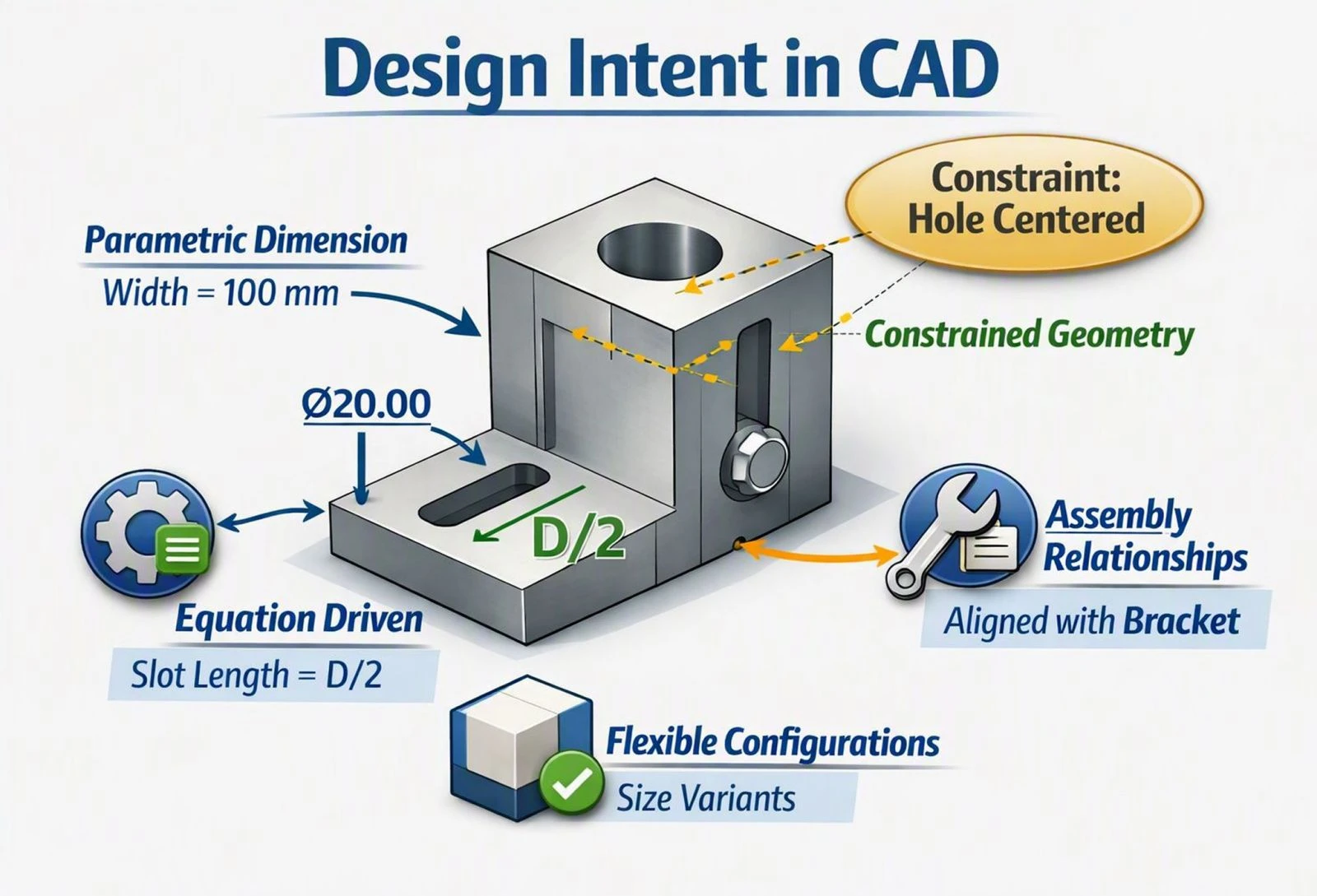
Design intent is the way a CAD model is built to behave when it changes. It captures not just what a part looks like, but the rules behind its shape: which features depend on each other, which dimensions matter most, and what should stay fixed when something else moves.
Consider a simple mounting plate with a hole in it. Two models can look identical on screen, yet behave completely differently when edited. In the first, the hole is dimensioned 20 mm from the left edge. In the second, it's constrained to the center of the plate. Make the plate wider, and the first hole stays near the edge while the second stays centered. Neither model is wrong, but only one reflects what the designer actually wanted.
That's the heart of design intent. Geometry shows the current state of a part. Design intent defines how that part should respond to change.
Why Design Intent Matters in Parametric Modeling
Parametric CAD works by storing a history of features, sketches, dimensions, and relationships. When you edit one value, the software recalculates everything that depends on it. This is what makes parametric modeling so powerful, but it also means every decision you make while building a model affects how it behaves later.
Real engineering designs change constantly. A customer requests a different size, a supplier changes a component, or manufacturing feedback calls for a thicker wall. A model with strong design intent absorbs these changes in seconds. A model without it might need to be rebuilt from scratch.
Good design intent also makes models easier for others to understand. When a colleague opens your file six months later, a logically built feature tree tells them how the part works and where to make changes safely. In collaborative and cloud-based CAD environments, where several people may work on the same design, that clarity becomes even more valuable.
Why CAD Models Break When Edited
Most rebuild errors trace back to a handful of common mistakes. Understanding them is the fastest way to stop fighting your models.
Under-Defined Sketches
When a sketch isn't fully constrained, the software has to guess how geometry should move during an update. Sometimes it guesses right. Often it doesn't, and lines shift, arcs flip, or profiles become invalid. A fully defined sketch leaves nothing to chance.
Referencing Unstable Geometry
Features are frequently built off edges and faces created by earlier features. If those earlier features change, the referenced edge may disappear or be renamed internally, and anything attached to it fails. Fillets and chamfers placed on edges are especially prone to this.
Poor Feature Order
The feature tree is a sequence, and each step builds on what came before. Adding fillets too early, sketching on faces that later get cut away, or mixing major and minor features without a clear order creates fragile dependencies that are hard to trace.
Hard-Coded Dimensions Where Relationships Belong
Typing in fixed values for everything ignores the relationships that actually drive the design. If a hole should always be centered or a wall should always be half the part's thickness, a fixed number won't keep up when the part changes.
Overly Complex Sketches
Cramming too much geometry into a single sketch makes it difficult to edit and easy to break. When one small element fails, the entire feature built from it goes with it.
How to Build CAD Models with Strong Design Intent
Plan Before You Model
Before opening a new part, ask a few simple questions. What are the critical dimensions? Which features are likely to change? What must stay symmetrical, centered, or aligned? A minute of planning often saves an hour of repairs.
Start from the Origin and Default Planes
Anchor your first sketch to the origin and build major features from the standard planes. These references never change, which gives your entire model a stable foundation. Placing symmetric parts around the origin makes mirroring and resizing much simpler.
Fully Define Every Sketch
Use constraints and relations such as horizontal, vertical, coincident, tangent, equal, and symmetric to describe how geometry relates, then add dimensions to set sizes. Aim for sketches that are fully defined, so every line and point has a clear reason to be where it is.
Dimension the Way the Part Will Be Made and Measured
Place dimensions based on how the part functions, how it will be manufactured, and how it will be inspected. If a machinist will measure a hole from a datum face, dimension it from that face in the model too. This keeps your CAD model aligned with your drawings and GD&T.
Keep Sketches Simple
Break complex shapes into several smaller features rather than one heavily loaded sketch. Simple sketches are easier to read, easier to edit, and far less likely to fail.
Order Features Logically
Build the main body first, then add secondary features like holes and pockets, and finish with cosmetic details such as fillets and chamfers. Saving fillets for the end is one of the easiest ways to reduce rebuild errors.
Reference Stable Geometry
Whenever possible, reference planes, axes, and sketches rather than edges and faces of solid features. These references are far less likely to change or disappear as the model evolves.
Use Equations and Global Variables
For parts that come in multiple sizes, link key dimensions with equations or variables. When one value changes, every related dimension updates automatically, keeping proportions consistent across the design.
Name Important Features
Renaming features like "Base Plate," "Mounting Holes," or "Shaft Bore" turns a long feature tree into a readable map of your design. It takes seconds and helps everyone who works on the model after you.
Design Intent in Assemblies
Design intent doesn't stop at individual parts. In assemblies, mates and constraints determine how components position and move relative to each other. Mating parts to stable references, avoiding redundant constraints, and choosing wisely between top-down and bottom-up assembly strategies all help assemblies update cleanly when parts change.
Using standard components from a verified 3D CAD library also supports good design intent, since those parts are already accurately modeled and ready to mate, leaving you free to focus on the custom geometry that matters.
Applying Design Intent in HVH Designer
HVH Designer is a browser-based parametric CAD platform, so the same principles apply directly. Sketch relations and dimensions let you fully define geometry, the feature history shows how each part is built, and the integrated 3D library of manufacturer-certified components gives your assemblies a reliable starting point. Because models live in the cloud, a well-structured part is easy for teammates to open, understand, and edit without breaking.
Frequently Asked Questions
What is design intent in simple terms?
It's how a CAD model is built to behave when changes are made, defining what should stay fixed, what should move, and how features relate to each other.
Why does my CAD model fail when I change a dimension?
Usually because of under-defined sketches, features referencing edges or faces that changed, or a poorly ordered feature tree.
Should every sketch be fully defined?
In most professional work, yes. Fully defined sketches update predictably and are much less likely to cause rebuild errors.
When should I add fillets and chamfers?
Generally near the end of the feature tree, after the main geometry is complete, since they depend on edges that may change.
Does design intent apply to direct modeling?
It matters less, since direct modeling doesn't rely on a feature history. However, thinking about how a part should change still leads to better, more manufacturable designs.
Conclusion
Design intent is the difference between a CAD model that simply looks right and one that keeps working as the design evolves. Models break when sketches are under-defined, references are unstable, or features are built without a plan. By anchoring to stable references, fully defining sketches, ordering features logically, and dimensioning with function in mind, you'll spend less time fixing errors and more time actually designing.
The next time a rebuild fails, don't just patch the error. Ask what the model was supposed to do, and rebuild it so that intent is clear.
Design intent is not about “right or wrong” geometry, but about capturing the purpose of the design. Two models can look identical but behave
differently — the one that matches the engineering requirement is the one with correct intent. That distinction helps beginners understand why
intent matters beyond just “making the part look right".