'%3e%3cpath%20d='M19.3359%2018.2109L14.7344%2013.6094C15.875%2012.2188%2016.5625%2010.4375%2016.5625%208.49609C16.5625%204.04297%2012.9492%200.429688%208.49609%200.429688C4.03906%200.429688%200.429688%204.04297%200.429688%208.49609C0.429688%2012.9492%204.03906%2016.5625%208.49609%2016.5625C10.4375%2016.5625%2012.2148%2015.8789%2013.6055%2014.7383L18.207%2019.3359C18.5195%2019.6484%2019.0234%2019.6484%2019.3359%2019.3359C19.6484%2019.0273%2019.6484%2018.5195%2019.3359%2018.2109ZM8.49609%2014.957C4.92969%2014.957%202.03125%2012.0586%202.03125%208.49609C2.03125%204.93359%204.92969%202.03125%208.49609%202.03125C12.0586%202.03125%2014.9609%204.93359%2014.9609%208.49609C14.9609%2012.0586%2012.0586%2014.957%208.49609%2014.957Z'%20fill='%23535B62'/%3e%3c/g%3e%3cdefs%3e%3cclipPath%20id='clip0_12799_29299'%3e%3crect%20width='20'%20height='20'%20fill='white'/%3e%3c/clipPath%3e%3c/defs%3e%3c/svg%3e)

CAD for Beginners

Computer-Aided Design, or CAD, is one of the most important tools in modern engineering and design. It replaces traditional manual drafting with precise computer-based modeling, allowing designers to create, modify, and analyze their ideas digitally. For beginners, CAD may seem complex at first, but at its core it is simply a way to turn sketches into accurate digital models that can be shared, tested, and manufactured. The transition from hand drawings to CAD has revolutionized industries by improving accuracy, efficiency, and collaboration.
What Is CAD and Why Does It Matter?
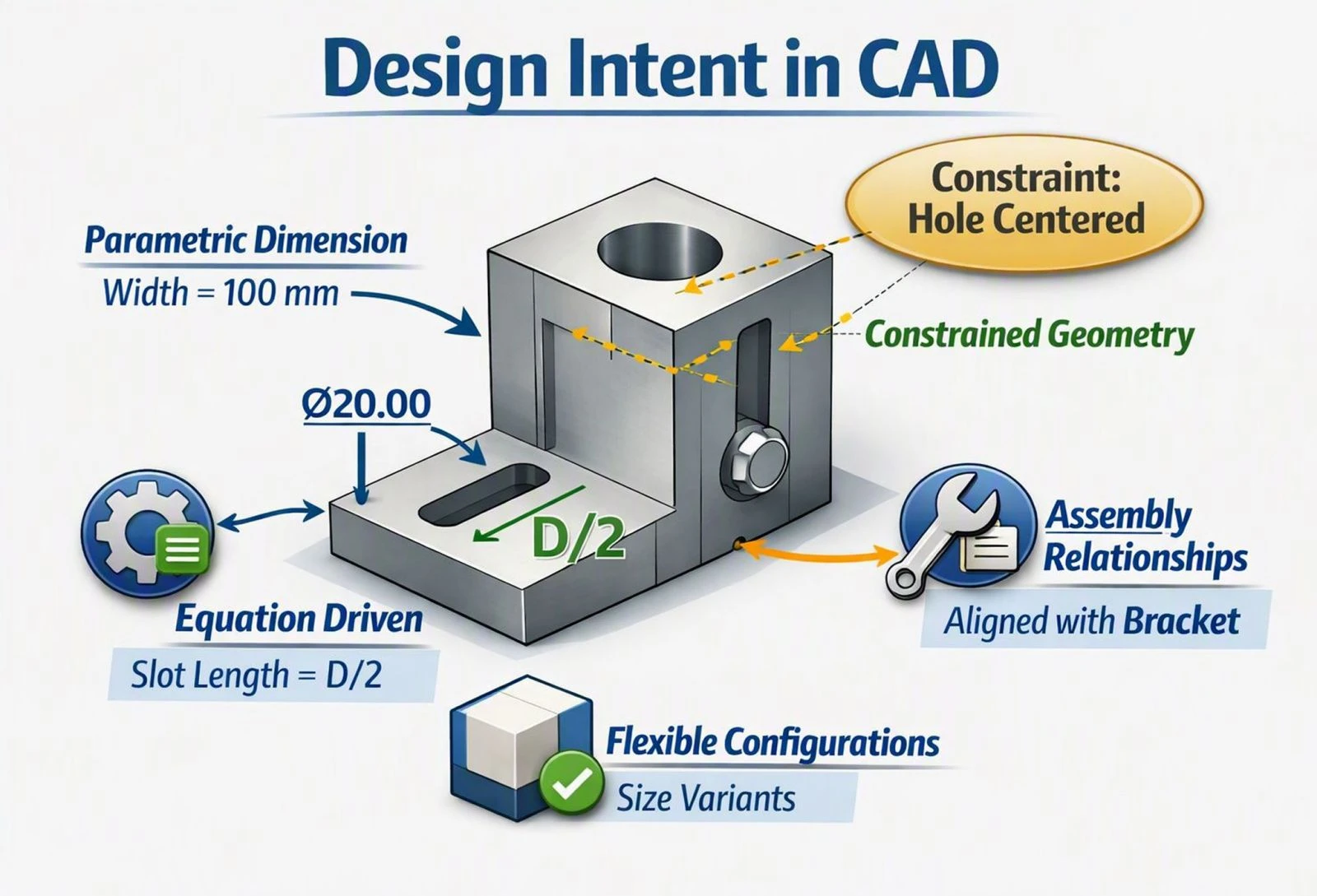
CAD matters because it ensures precision and efficiency. Every line and dimension is mathematically defined, eliminating the errors common in manual drawings. It also allows rapid iteration, so designers can test variations without starting from scratch. Visualization is another major benefit, as 3D models provide a clear picture of how a product will look and function before it is built. For beginners, these advantages highlight why CAD is not just a tool but a fundamental skill in engineering, architecture, and product design.
The Basics of CAD Sketching
The first step in learning CAD is to understand the basics of sketching. Beginners start with simple 2D shapes such as lines, circles, and rectangles. These sketches form the foundation of more complex designs.
From 2D Sketches to 3D Models
Once a sketch is complete, it can be transformed into a 3D model using tools like extrusion, revolve, or loft. This process turns flat drawings into solid parts that can be visualized from any angle.
Building Assemblies
As learners progress, they move into assemblies, where multiple parts are combined with joints or mates to create complete products. This mirrors real-world manufacturing, making CAD a bridge between concept and production.
Choosing the Right CAD Software for Beginners
Choosing the right software is an important step for newcomers. Each program has unique strengths, but all share the same basic principles, so learning one makes it easier to transition to others.
AutoCAD
AutoCAD is widely used for 2D drafting and basic 3D work, and it remains an industry standard in many drafting-focused fields.
Fusion 360
Fusion 360 is beginner-friendly, cloud-based, and integrates modeling with simulation and manufacturing, making it a popular starting point for hobbyists and professionals alike.
SolidWorks
SolidWorks is popular in mechanical engineering for assemblies and parametric modeling, and it's widely taught in engineering programs.
HVH Designer — A Simple, Cloud-Based CAD Tool for Beginners
HVH Designer is a newer, cloud-based CAD platform designed to make it easy for anyone to start designing without a steep learning curve. As a lightweight, browser-accessible option, HVH Designer is a great tool for beginners who want to quickly learn CAD design and exercise their skills. A quick way to design simple beginner design and bring those into life with 3D printing or machining methods.
Best Ways to Practice and Learn CAD
The best way to learn CAD is through practice. Beginners should start with simple projects such as modeling a bracket, designing a gear, or creating a basic 3D printed object. These exercises teach sketching, dimensioning, and solid modeling. As skills grow, learners can move on to assemblies, sheet metal design, and simulations. Step-by-step tutorials and guided exercises are especially helpful in building confidence and reinforcing concepts.
Understanding CAD Drafting Standards
CAD is also about communication. Engineering drawings are the universal language between designers and manufacturers, and beginners must learn drafting standards like ISO and ANSI.
Key Drafting Conventions
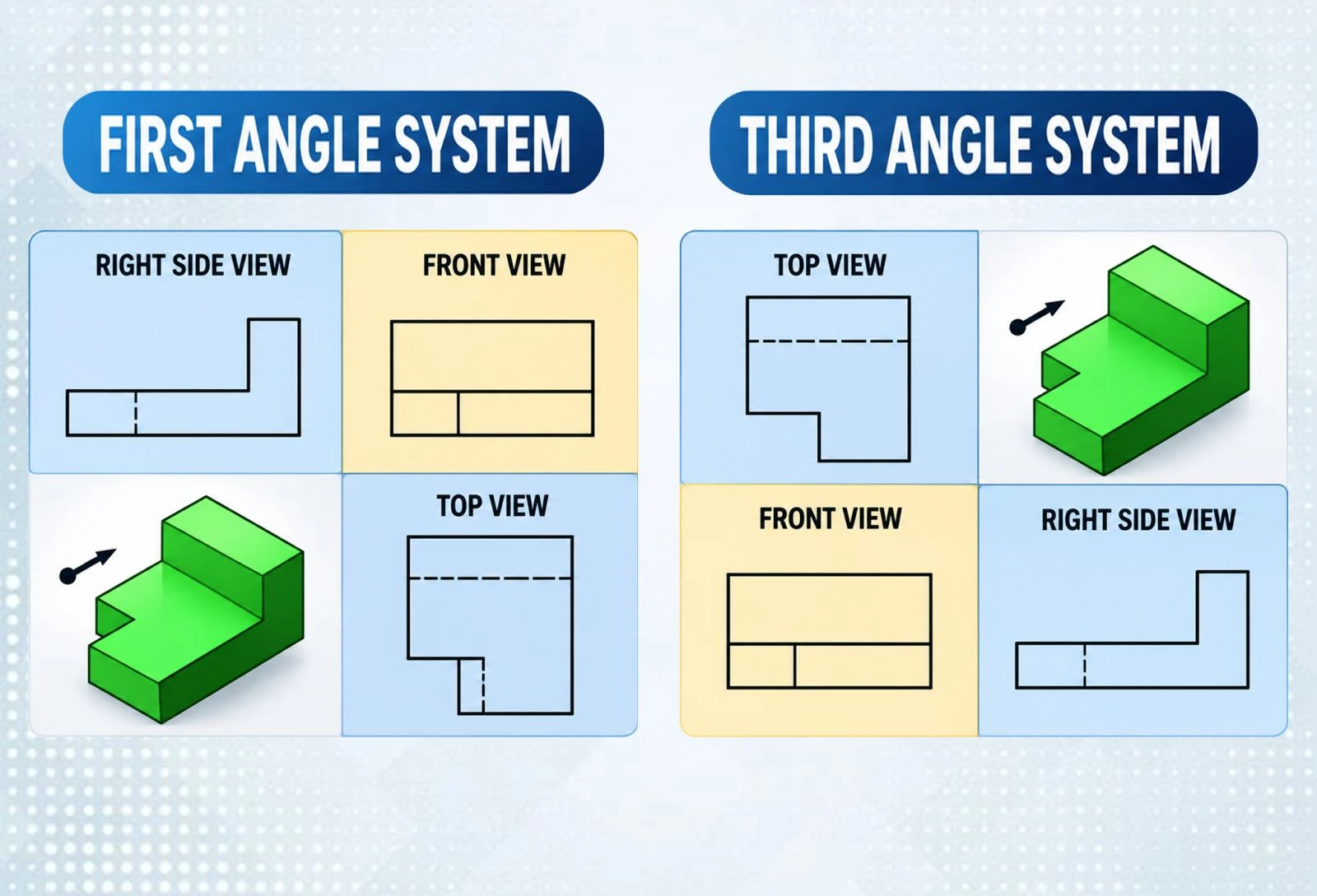
These standards define line types, projection methods, and dimensioning rules. For example, center marks and centerlines are used to indicate hole centers and symmetry, while first-angle and third-angle projection determine how views are arranged on a drawing. Following these standards ensures that designs are interpreted correctly across different industries and countries.
Tips for Beginners Learning CAD
Learning CAD can be challenging, but a few tips make the journey smoother:
-
Start with basic sketches before moving to complex 3D models
-
Learn to use constraints to keep sketches accurate
-
Practice dimensioning carefully, since precision is critical in engineering
-
Explore online tutorials and communities for guidance and support
-
Practice regularly to build confidence and mastery
Over time, CAD becomes more than software — it becomes a way of thinking about design problems with precision, creativity, and efficiency.
Conclusion: Building Your CAD Foundation
CAD for beginners is about building a strong foundation in digital design. By starting with simple sketches, learning core modeling tools, and understanding drafting standards, newcomers can quickly gain confidence. With practice, CAD evolves from a technical skill into a mindset that enables engineers and designers to solve problems, innovate, and bring ideas to life with accuracy and clarity. Tools like AutoCAD, Fusion 360, SolidWorks, and cloud-based options such as HVH Designer all offer accessible starting points — the key is to pick one and start sketching.