
Free file manager plugin for CKEditor 4. Image Editor is included. Supports PHP and Node.js.
[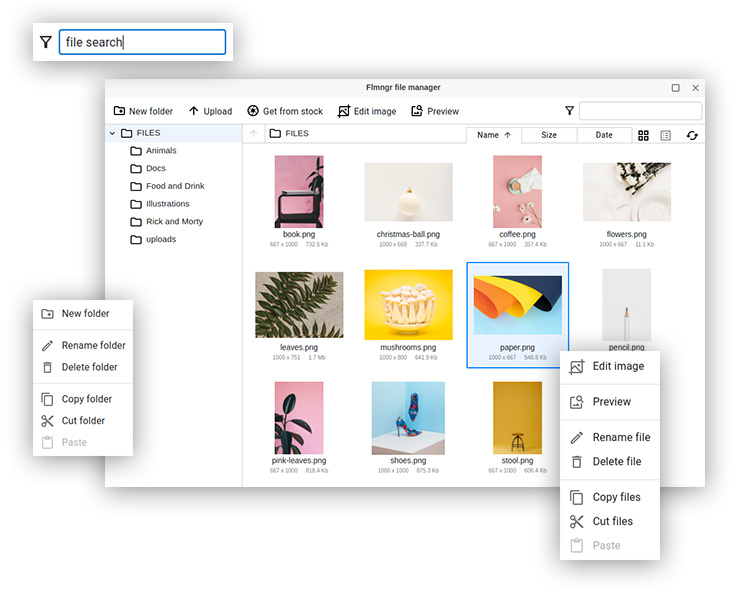](https://flmngr.com) ## Intro This is a **file manager plugin for CKEditor 4**, free to install and use. This plugin can use free or premium version of Flmngr, the only difference in features is image editor is not included into free version. If you have already installed and use [N1ED](https://n1ed.com) plugin, please do not install this one: Flmngr is included into N1ED. Use this Flmngr add-on when you need just file manager and image editor only. ### Main features: - Seamless integration with CKEditor 4 - [ImgPen](https://imgpen.com) image editor onboard - Easy installation as CKEditor plugin - Support of PHP, and Node backends - Upload files and images - All standard features to organize files - Dynamic fast browsing big folders - Support of local storage, Amazon S3 and Azure Cloud - [API](https://flmngr.com/doc/api) for programmatic calls. ## Installation [Download File Manager plugin](https://flmngr.com/download/flmngr-ckeditor.zip) Copy `file-manager` directory into `ckeditor/plugins/`. You will have such file path as result: `ckeditor/plugins/file-manager/plugin.js`. ### If you use `config.js` Add these lines into your "config.js" file to activate the plugin: ```js config.extraPlugins = "file-manager"; config.Flmngr = { urlFileManager: "http://your-website.com/flmngr/flmngr.php", urlFiles: "http://your-website.com/files/" }; config.toolbar = [ // ...your toolbar goes here... ["Flmngr", "Upload", "ImgPen"] ]; // config.apiKey = "SOME_KEY"; -- optional ``` All further job will be done by it. ### If you use initialization script When you pass parameters to CKEditor 4 manually as function argument, do the same but inside config structure: ```js CKEDITOR.replace( "#editor", { extraPlugins: "file-manager", Flmngr: { urlFileManager: "http://your-website.com/flmngr/flmngr.php", urlFiles: "http://your-website.com/files/" }, toolbar: [ // ...your toolbar goes here... ["Flmngr", "Upload", "ImgPen"] ], // apiKey: "SOME_KEY" -- optional } ); ``` ## Backend installation This plugin can access your server only if you installed a backend to support calls from Flmngr. Please follow the instructions to install Flmngr backend on your server (a number of different backend editions are over this link): [PHP](https://flmngr.com/doc/install-file-manager-server) or [Node.js](https://flmngr.com/doc/install-file-manager-server-node). There is also a [standalone microservice](https://flmngr.com/doc/install-file-manager-server-microservice) option. ## Configuration Please see installation above: you need to feel variables `Flmngr.urlFileManager` and `Flmngr.urlFiles` in order to link your plugin with your backend. Also do not forget to add a new buttons on a toolbar. They are: `Flmngr` (to call file manager) and `ImgPen` (to call image editor). See example values in Installation section above. ## Support Please do not hesitate to ask any questions regarding installation or using sending a letter to [support e-mail](mailto:support@helpdesk.edsdk.com).